Main section
How encrypting e-mails in Outlook and other programmes improves security in your organization
E-mails are relatively easy to intercept and read – or even to manipulate – if they are not encrypted. The solution: e-mail certificates (S/MIME).
E-mail as a security risk
E-mails are indispensable in day-to-day business – and one of the greatest security risks. Worldwide, more than 300 billion messages are sent every day. Without encryption, they are comparable to postcards: readable for anyone with access to the transport route. Unlike postcards, e-mails can be searched for key terms, enabling them to be specifically selected for attacks.
Known cyber attacks via e‑mail include phishing or malware e‑mails, such as Trojans, ransomware or spyware. But digital messages are not only a gateway for malware. The content itself is also highly relevant to attackers. This is where encryption comes into play: if content is confidential, the traditional postcard is placed into an envelope. This prevents unauthorised persons from accessing it and makes it significantly more difficult to view. This function is also fulfilled by an e‑mail certificate. E‑mails must always be encrypted separately.
E-mail as a business risk
If no e-mail certificate is used, confidentiality is not guaranteed. Content can not only be read by unauthorised persons, but also manipulated. Depending on the type of content or data, this can cause reputational damage or even constitute an existential threat, particularly in a business context. This applies especially if it involves confidential information such as personal data or contracts. In such cases, there may even be a violation of the duty of confidentiality. In accordance with the Federal Act on Data Protection (FADP) and the European General Data Protection Regulation (GDPR), data must be protected against unauthorised processing by means of suitable technical and organisational measures. Encryption is regarded as an appropriate measure in line with the current state of the art (Art. 8 FADP and Art. 32 GDPR).
Webinar: How Cryptographic Signatures Close the Gaps AI Fraud Exploits

AI-enabled fraud succeeds where trust is based on appearance such as voice, video, or document lookandfeel. Cryptographic signatures and seals operate in a different layer: they replace perception with verifiable proof.
In this technical webinar, Mark Vincent, Head of Professional Services & Operations explains which AI fraud vectors are effectively reduced by qualified electronic signatures (QES) and regulated electronic seals and where their limits are.
Designed for architects, security professionals, and technical decision makers in regulated or trust critical contexts.
S/MIME: the standard for secure e-mail in companies
S/MIME (Secure/Multipurpose Internet Mail Extensions) is the established standard for e-mail signature and encryption in the corporate environment. Unlike TLS/SSL certificates, which secure the transport route, S/MIME protects the message itself – end-to-end.
What S/MIME achieves
-
Authenticity: the sender is uniquely verified
-
Integrity: every manipulation of the message is detected
-
Confidentiality: only the intended recipient can read the message
-
Non-repudiation: the sender cannot deny sending (for SV certificates)
Here’s how S/MIME works
Unlike SSL certificates, S/MIME certificates are not published automatically. Senders and recipients must exchange their public keys beforehand. Communication then works as follows:
-
The sender signs the message with their private key and encrypts it with the recipient’s public key.
-
The recipient decrypts the message with their private key and verifies the signature with the sender’s public key.
The signature is calculated based on the message content. Any subsequent changes will then be identified.
Side note: How encryption works
S/MIME certificate types
Not every S/MIME certificate is the same. Depending on the use case and security requirements, SwissSign offers three levels of validation – in accordance with the international S/MIME Baseline Requirements of the CA/Browser Forum.
Certificate type |
Validation |
Included in the certificate |
Suitable for |
|---|---|---|---|
|
S/MIME Mailbox-Validated |
Mailbox Validation (MV) |
E-mail address |
Simple signature and encryption |
|
S/MIME Organization-Validated |
Organization Validation (OV) |
Organization + e-mail |
Functional mailboxes, automated processes |
|
S/MIME Sponsor-Validated |
Sponsor Validation (SV) |
Person + organization + e-mail |
Personal signature with proof of identity |
Mailbox Validation (MV)
In the case of MV certificates, only the existence of the e-mail address and the requester’s access to it are checked. The person’s identity is not verified.
Area of application: signature and encryption of e-mails if no legally reliable identification of the sender is required.
Restriction: cannot be used for authentication (e.g. login to systems).
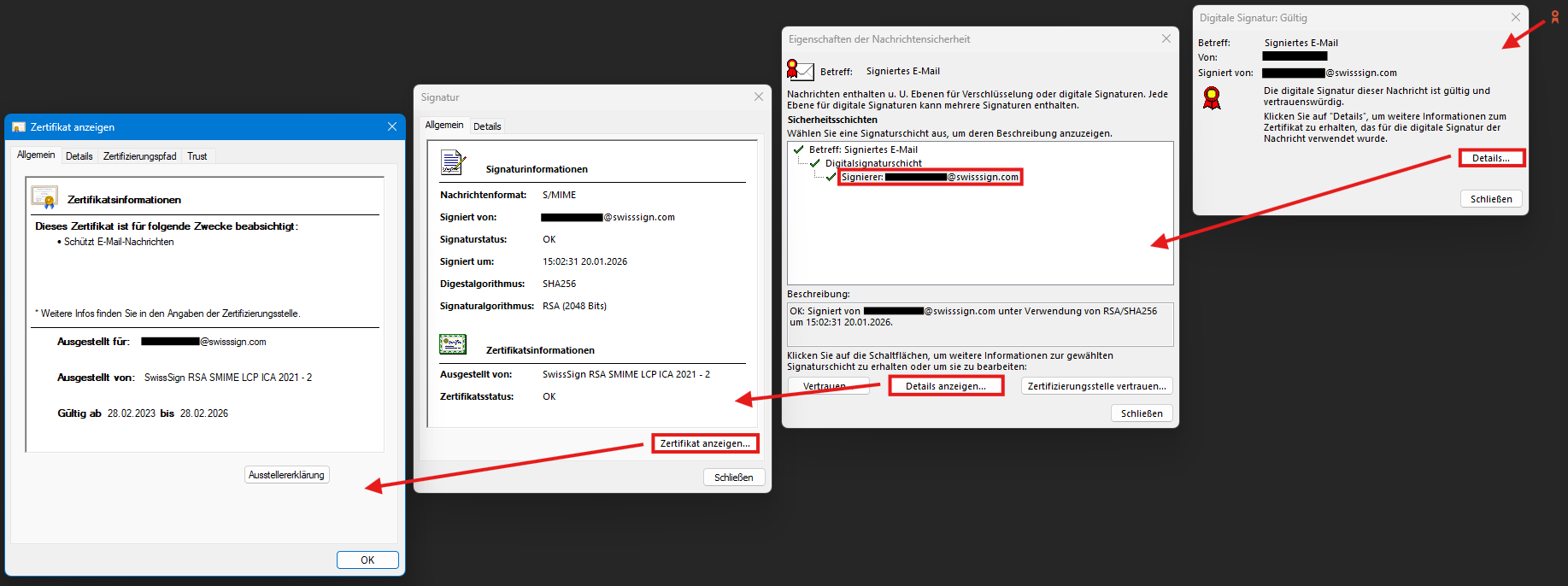
Here is an example of a mailbox-validated S/MIME certificate:

Organization Validation (OV)
OV certificates do not confirm a person, but an organization as the owner of an e-mail address. SwissSign checks the organization using public registers (e.g. the commercial register) and verifies control over the e-mail domain.
Area of application: central e-mail addresses, such as accounting@, support@, info@ or noreply@ – i.e. functional mailboxes that are not assigned to an individual person.
Advantages compared to SV certificates for functional mailboxes
-
No internal registration process with individual employee identity verification
-
Simpler automation (no separate handover of first name and last name required)
-
The organization name is displayed instead of a person’s name in the e-mail client
Sponsor Validation (SV) with identity check
SV certificates offer the highest level of validation. In addition to the organization, the identity of the person using the certificate is also verified. The registration authority ensures that only that person can use the e-mail address with that identity.
Area of application: personal e-mail addresses of employees if legally reliable signatures or increased probative value are required.
Additional options
-
Use for authentication (e.g. login to financial systems, VPN)
-
Greater probative value and non-repudiation in a legal context
-
Better phishing protection thanks to verified personal identity
Why non-repudiation is important
With an MV certificate, someone could sign e-mails with [email protected], even though the company uses abc-firma.com. SV certificates prevent such confusion – the recipient can rely on the message actually coming from the specified person.
Display in e-mail clients
In everyday use, the differences between the certificate types are not immediately visible. E-mail clients such as Outlook initially display only a signature icon. The details become visible only on closer inspection:
-
MV: only shows the e-mail address in the signature field
-
SV: shows the full name of the person
The complete certificate information is only visible in Outlook after several clicks: Signature icon → Details → Show certificate. All information about the issuer, validity and the contained identity attributes can be found there.
The main difference lies in the probative value, liability and possible uses in the authentication environment.
What certificate for what use case?
Choosing the right type of certificate depends on the specific usage scenario.
Use case |
Recommended certificate |
Reason |
Solution by SwissSign |
|---|---|---|---|
|
Personal employee e-mail, legally binding |
SV | Proof of identity, non-repudiation, authentication possible |
|
|
Personal employee e-mail without special requirements |
MV or SV |
MV for basic requirements, SV for additional security |
|
|
Functional mailbox (accounting@, support@) |
OV |
Connection to the organization without personal reference |
|
|
Automated system messages (noreply@) |
OV |
No person identifiable, simple automation |
|
|
E-mail gateway for the entire organization |
SV+ OV combined | SV for employees, OV for central addresses |
|
E-mail gateways: central solution for organisations
For organisations with many employees, the installation of individual S/MIME certificates on every workstation is time-consuming. E-mail gateways offer a more efficient alternative: they sign and encrypt all e-mails to external recipients centrally.
How it works
-
Signature is provided automatically for all outgoing e-mails
-
Encryption is activated automatically if the recipient’s public key is known
-
Key management (public and private keys) is handled centrally
Advantages for organisations
-
No need to install plug-ins on end devices
-
Support for all common encryption methods
-
Compatibility with third-party gateways
-
Uniform security guidelines for the entire organisation
-
Simpler compliance evidence thanks to central logging
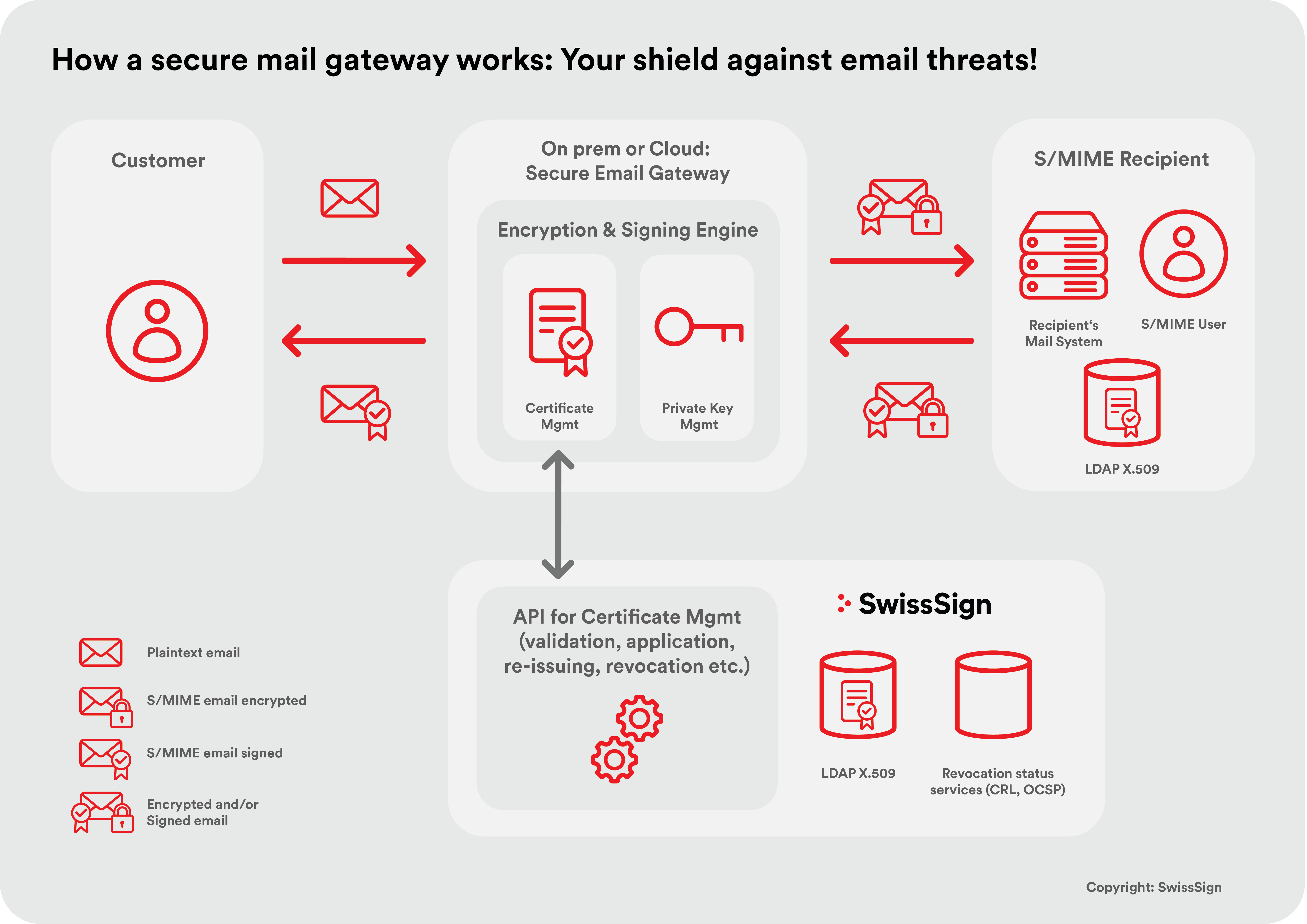
The gateway not only takes care of the cryptographic operations but can also enforce policies: which e-mails need to be encrypted? Which recipient domains require special treatment? How are unknown recipients handled?
SwissSign works with a network of partners who support the integration of certificates into existing gateway solutions or who have already integrated SwissSign certificates into their products.
S/MIME certificates on a large scale: Managed PKI
Organisations with hundreds or thousands of S/MIME certificates need efficient administrative processes. Managed PKI from SwissSign gives you full control over your certificate database – ideally integrated into your gateway solution.
Central management
-
Request, renew and revoke certificates via a single portal
-
Delegated administration for different departments or locations
-
Overview of all active certificates with expiry dates and statuses
Automation
-
Enables workflows for onboarding new employees
-
Automatic notifications before certificate expiry
-
API integration for fully automated processes
Compliance
-
Seamless audit trails for all certificate operations
-
Reporting for internal and external audits
-
Compliance with regulatory requirements (GDPR, FADP, sector-specific directives)
In combination with Certificate Lifecycle Management (CLM), you can keep track of all your organisation’s certificates – regardless of the type of certificate or the issuing CA. This is particularly relevant if you manage TLS certificates and private certificates in addition to S/MIME.
More on Managed PKI from SwissSignFrequently asked questions (FAQ)
The maximum duration of an S/MIME certificate was shortened from three years to two in June 2025 – find out more in our blog post.
The certificate should be revoked immediately. With Managed PKI, you can do this centrally via the management portal. The revocation is published via Certificate Revocation Lists (CRL) and OCSP (Online Certificate Status Protocol) so that recipients can recognize the invalidity. E-mails that have already been encrypted remain readable if the private key has been archived – this is particularly relevant for compliance requirements.
Only SV certificates (sponsor-validated) can be used for authentication, for example for logging in to financial systems and for accessing VPN or other protected resources. MV and OV certificates are limited to e-mail signature and encryption.
The simplest way: send the communication partner a signed (non-encrypted) e-mail. This contains your public key. The recipient saves the certificate in their address book and can then send you encrypted messages. A central key directory (LDAP) or an e-mail gateway that automates key exchange is recommended for use throughout the organization.
TLS (Transport Layer Security) encrypts the connection between mail servers – comparable to an armoured transport vehicle. However, the e-mail itself remains in plain text and can be read on any server in the transport route. S/MIME can encrypt the message itself – comparable to a locked safe in a transport vehicle. Only the intended recipient can read the content, regardless of how many servers the message passes through. Both technologies should be combined for maximum security.
Yes. S/MIME certificates can be requested and renewed automatically via the Managed PKI using REST API. Automation makes particular sense for OV certificates (functional mailboxes) and integration into systems such as Microsoft Intune or mail gateway solutions. SV certificates always require a manual step in the validation process due to identity verification.
All common e-mail clients natively support S/MIME: Microsoft Outlook (desktop and web), Apple Mail (macOS and iOS), Mozilla Thunderbird, Samsung Mail and most other enterprise e-mail clients. As a rule, set-up requires the import of the certificate and the private key. In Managed PKI environments, this process can be automated using MDM solutions such as Microsoft Intune.
As a rule of thumb: one SV certificate per employee with their own e-mail address, plus OV certificates for all functional mailboxes. An organization with 500 employees and 20 central e-mail addresses therefore requires around 520 certificates. If an e-mail gateway is used, the number of individual certificates may be reduced, as the gateway can sign centrally.
The costs comprise: certificate costs (depending on type and quantity), implementation costs (gateway integration, client configuration, training) and ongoing operation (certificate renewals, support). Customers obtain Managed PKI from SwissSign and use our volume prices – you can calculate your individual price in the online order portal.